
Download FindPng – AI‑Powered PNG Creator & Background Remover
Overview: Why FindPng Stands Out in the Crowded Image‑Editing Market
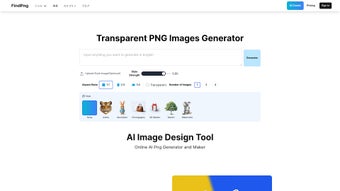
In today’s visual‑first world, businesses and creators constantly search for tools that can produce high‑quality PNG files without the hassle of complex software. FindPng answers that call with a sleek, web‑based interface powered by artificial intelligence. Unlike traditional graphic editors that require a steep learning curve, FindPng lets you generate transparent PNG images in seconds, whether you need a 3D render, a clean vector logo, or an anime‑style illustration. The platform’s AI engine automatically detects and removes backgrounds, making it ideal for e‑commerce product shots, social‑media graphics, or quick mock‑ups for presentations.
What truly differentiates FindPng is its blend of simplicity and depth. Users can start with a simple text prompt—type “red sports car in neon style” and the tool produces a ready‑to‑use PNG with a transparent backdrop. For more precise control, the editor offers style sliders, color palettes, and layer management, all within a browser window.
Because it runs entirely online, there’s no need to install heavyweight software, and you can access your projects from Windows, macOS, Android, or iOS devices. The built‑in gallery showcases community‑created images, offering inspiration and proof of the tool’s capabilities. Whether you’re a solo freelancer, a marketing team, or a hobbyist, FindPng delivers professional‑grade results while keeping the workflow fast, free, and secure.
Security and privacy are also baked into the platform. All uploads are processed over HTTPS, and images are stored temporarily unless you choose to save them to your account. The free tier provides generous daily limits, while premium plans unlock higher resolution outputs and bulk processing. In short, FindPng is more than a PNG generator; it’s an AI‑driven design companion that removes technical barriers and lets creativity flow. The service continuously receives updates that improve AI accuracy, add new artistic styles, and tighten security measures, ensuring that long‑term users benefit from a tool that evolves alongside design trends.
Key Features that Make FindPng a Must‑Have Tool
FindPng’s feature set is built around the idea of “instant professional results”. Each capability is designed to reduce the number of steps a designer normally takes, from concept to final export. Below is a deeper look at why each feature matters for everyday workflows.
- AI‑Generated PNGs: Create transparent images from text prompts or uploaded sketches in seconds. The AI understands context, lighting, and perspective, allowing you to generate assets that would otherwise require a 3‑hour manual effort.
- Automatic Background Removal: One‑click removal with edge‑preserving algorithms for clean cuts. It works equally well on complex subjects such as hair, fur, or semi‑transparent objects, eliminating the need for manual masking.
- Multiple Art Styles: Choose from 3D, vector, anime, flat‑design, and more to match your brand voice. Each style is fine‑tuned by artists, giving you a library of aesthetic options without hiring a designer.
- Customizable Output: Adjust resolution, canvas size, and transparency levels before download. Whether you need a 72 dpi web asset or a 300 dpi print‑ready file, the controls are intuitive.
- Layer & Mask Controls: Fine‑tune individual elements, add shadows, or apply gradients without leaving the browser. This feature bridges the gap between a simple generator and a full‑featured editor.
- Batch Processing (Premium): Upload up to 100 images at once for mass background removal or style conversion. Batch jobs run on dedicated servers, delivering results in minutes rather than hours.
- Cross‑Platform Access: Works on Windows, macOS, Linux, Android, and iOS via any modern browser, ensuring you can work from a laptop at the office or a tablet on the go.
- Secure Cloud Storage: Save projects to your personal account with encrypted storage for 30 days. The storage is GDPR‑compliant, giving peace of mind for businesses handling sensitive visuals.
- In‑App Gallery: Browse community creations for inspiration and download ready‑made assets. The gallery also acts as a showcase for what the AI can achieve, sparking new ideas.
- API Integration (Enterprise): Embed FindPng’s AI engine into your own workflow or SaaS product. The RESTful API includes authentication, rate limiting, and detailed documentation for developers.
Together, these features form a cohesive ecosystem that eliminates the traditional hand‑off between ideation, editing, and export. The result is a faster turnaround time, lower production costs, and a more consistent visual language across all your assets.
Installation, Usage & Compatibility – Getting Started in Minutes
Because FindPng is a web‑based application, there is no traditional installation process. Simply navigate to findpng.com using any up‑to‑date browser (Chrome, Firefox, Edge, Safari) and you’re ready to start. For power users, the platform offers optional desktop shortcuts that can be added to your operating system’s start menu for instant access, and a progressive web‑app (PWA) version that works offline for viewing saved projects.
Step‑by‑step usage guide:
- Create an account (optional): Register with an email address to unlock project history, cloud storage, and premium features. Social logins (Google, Apple) are also supported for quicker onboarding.
- Choose a creation mode: Select “Generate from Prompt” for AI‑driven creation or “Upload Image” for background removal and style conversion.
- Enter your description: Type a clear, concise prompt (e.g., “minimalist blue leaf icon”). The AI will render a PNG within 10‑15 seconds. You can also upload a sketch or raster image to let the AI interpret and enhance it.
- Refine the result: Use the style sliders to adjust realism, line thickness, or color saturation. For uploads, click “Remove Background” and let the AI isolate the subject. Advanced users can access the “Layer Editor” to add masks, shadows, or custom gradients.
- Download or save: Click “Download PNG” for an instant file, or “Save to Cloud” to keep it in your account. Export options include PNG, JPEG, and SVG when the selected style supports vector output.
- Explore additional tools: The “Batch Queue” lets you schedule multiple jobs, while the “API Console” provides quick test calls for developers.
Operating system compatibility: The tool is built on HTML5, WebGL, and WebAssembly, ensuring smooth performance on Windows 10/11, macOS 10.15+, Linux distributions, Android 8.0+, and iOS 13+. Because processing happens on the server side, even low‑end devices can generate complex images without lag. However, for the best experience, a stable internet connection (minimum 5 Mbps) is recommended, and a modern browser with JavaScript enabled is required.
Tips for a seamless experience: Clear your browser cache if you notice occasional lag, enable hardware acceleration in browser settings for smoother canvas rendering, and use the “Help Center” for troubleshooting common issues such as timeout errors or unexpected AI outputs. The support team offers live chat during business hours and a comprehensive knowledge base for 24/7 assistance.
Pros:
- No software download required; works directly in the browser.
- Fast AI rendering, often under 20 seconds per image.
- High‑quality transparent PNG output suitable for print and digital media.
- Robust background removal that handles hair, fur, and intricate edges.
- Generous free tier for occasional users.
- Cross‑platform accessibility from desktop and mobile devices.
- Secure cloud storage with automatic encryption.
Cons:
- Premium subscription needed for high‑resolution (4K) exports.
- Batch processing limited to paid plans.
- Internet dependency; offline use not possible for generation.
- Complex prompts may require tweaking to achieve exact results.
- Advanced layer editing is less powerful than dedicated desktop apps.
Frequently Asked Questions
Below are the most common questions from new and experienced users alike. Each answer is marked up with FAQ schema to help search engines surface the information directly in search results.
Is FindPng truly free or are there hidden costs?
FindPng offers a completely free tier that allows up to 20 PNG generations per day and basic background removal. Premium plans start at $9.99 /month and unlock higher resolutions, unlimited daily usage, and batch processing. There are no hidden fees; all pricing is transparent on the website.
Can I use the generated PNGs for commercial projects?
Yes. All PNGs created with FindPng are royalty‑free for commercial and personal use, provided you comply with the terms of service. Premium users receive an extended license that covers mass distribution and resale.
How secure is my uploaded image data?
Uploads are encrypted via HTTPS and processed on secure servers. Images are stored only for the duration of the session or until you manually delete them. For premium accounts, encrypted cloud storage is available for up to 30 days.
Does FindPng work on mobile browsers?
Absolutely. The responsive design adapts to both Android and iOS browsers, offering the same AI generation and background removal features as the desktop version. Touch gestures are supported for style adjustments.
What file formats are available besides PNG?
While PNG is the default due to its lossless transparency, you can also export to JPEG (for non‑transparent use) or SVG (vector output) when the selected style supports vector conversion.
Conclusion: Should You Download FindPng?
If you’ve ever struggled with clunky desktop editors, paid stock‑photo subscriptions, or manual background removal, FindPng provides a refreshingly simple yet powerful alternative. Its AI engine delivers high‑quality transparent PNGs in seconds, and the web‑based nature means you can work from any device without installing bulky software. The free tier is generous enough for occasional creators, while the premium plans scale smoothly for agencies or e‑commerce teams that need bulk processing and ultra‑high‑resolution assets.
In short, download FindPng today to streamline your graphic workflow, boost productivity, and keep your design budget in check. Click the button below to start creating instantly—no credit card required.
Expert Review
FindPng delivers fast, high‑quality PNG generation and reliable background removal directly in the browser. Its AI capabilities and cross‑platform accessibility make it a standout choice for designers and marketers.
Pros:
- Instant AI generation saves time.
- No installation required; works on any device.
- Strong background removal even on tricky edges.
- Generous free tier for light users.
- API access for enterprise integration.
Cons:
- High‑resolution exports require a paid plan.
- Offline generation is not possible.
- Complex prompts may need iteration.
Rating: 5/5
TechEditor



.png)



